Описание
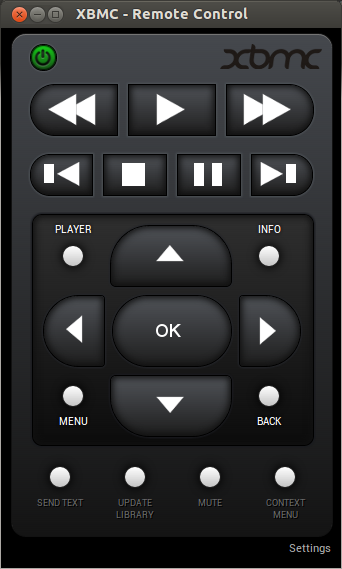
XBMC Remote Control (Frodo)
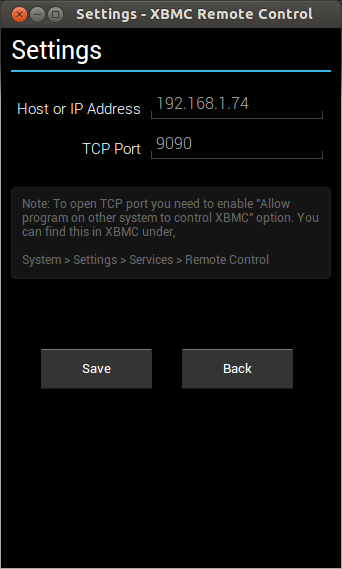
Remote Connects using TCP port (default 9090). Will work only with Frodo and above.
You have to enable "Allow program on other system to control XBMC" option. You can find this under,
System > Settings > Services > Remote Control
Note: This extension makes use of TCP port, do not confuse it with HTTP PORT. By default TCP port is 9090 if you haven't changed it leave it to default in settings.
Note: If you are wondering why there is no username and password options, this extension connects using websocket over TCP port. Even if your XBMC has username and password confirgured don't worry about it, it will still connect. Cheers!
Что нового
v 2.3.1
issue #27 <a href="https://github.com/goldenratio/xbmc-web-remote/issues/27" rel="nofollow">https://github.com/goldenratio/xbmc-web-remote/issues/27</a>
Don't shutdown the computer without notice
v 2.3.0
issue #25 <a href="https://github.com/goldenratio/xbmc-web-remote/issues/25" rel="nofollow">https://github.com/goldenratio/xbmc-web-remote/issues/25</a>
Remove "Tab" permission
Информация
- Тип
- Packaged
- Версия
- 2.3.1
- Размер
- 395.5 KB
- Опубликовано
- 2013-07-17
- Обновлено
- 2015-07-19
- Языки
- en-US
- Устройства
- android-mobile, android-tablet, firefoxos
- Сайт
- https://github.com/goldenratio/xbmc-web-remote
- Поддержка
- https://github.com/goldenratio/xbmc-web-remote
- karthikeyanvj@gmail.com
- Манифест
- mini-manifest · xbmc-remote-control-2.3.1.zip
- ID
- 455728 · xbmc-remote-control